
FS25 Vehicle Sync V1.0
The harvester steers the grain cart. Unload on the go, in multiplayer.
Leader/follower machine synchronisation, modelled on the real systems used on modern farms.
One player drives the combine harvester, another one sits in the tractor with the grain cart. When the tractor driver engages the sync, the harvester takes over the tractor’s steering and speed and keeps the cart right below the pipe outlet. The harvester driver can nudge the cart to fill it evenly. The tractor driver can take over at any moment.
Features
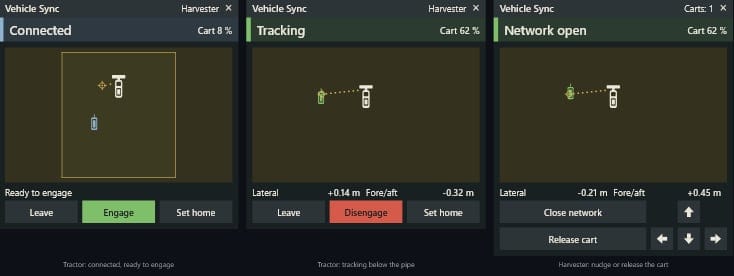
- Join, engage, track. The tractor joins the harvester’s sync network, drives into the operational zone and engages. The sync goes from Acquiring to Tracking once the cart is in position.
- Nudging. The harvester driver moves the cart forward, back, left or right in 25 cm steps, or releases it.
- Instant takeover. Steering, the pedals or cruise control give control back to the tractor driver immediately. After a steering takeover the tractor keeps the harvester’s speed, so the cart does not brake hard below the pipe.
- Safe aborts. The sync ends after a 5 s countdown when the harvester stops, reverses, turns sharply or drives faster than 16 km/h, or when the cart is full. A short stop does not end it.
- Home point. By default the cart sits below the pipe outlet. The tractor driver can store another position, and it is saved with the savegame.
- In-cab terminal. One window shows the state, the cart fill level and a top view of the harvester, the operational zone, the home point and the cart. It works with the mouse and can be moved by dragging.
- Multiplayer first. Everything is calculated on the server and synced to every player, including players who join a running game.
- Driver assist, not an AI helper. A player has to sit in the tractor, like in the real system. No helper wages, and no AI job slot is used.
How it works
| Step | Who | What |
|---|---|---|
| 1 | Harvester | Open the terminal (Left Alt + Y) and click Open network. |
| 2 | Tractor | Drive within 60 m of the harvester and click Join network. The terminal shows the nearest open network and how far away it is. |
| 3 | Tractor | Drive into the operational zone beside or behind the harvester, then click Engage while the harvester is moving. |
| 4 | Both | The tractor steers and matches its speed on its own: Connected → Acquiring → Tracking. |
| 5 | Harvester | Use the arrow buttons to nudge the cart, or click Release cart. |
The sync ends immediately when the tractor driver steers, uses the pedals, switches on cruise control, leaves the tractor or switches off the engine. It ends after 5 seconds when one of these lasts that long, the terminal and a blinking warning count down:
- the harvester stops, reverses or drives faster than 16 km/h,
- the harvester turns sharply, for example at the headland, or the cart is too far from the home point,
- the grain cart is full.
The tractor stays connected to the network, so one click engages the sync again.
Only vehicles of the same farm, or of farms with access to each other, can sync. Only the player sitting in a vehicle can operate it.
Controls
| Input | Action |
|---|---|
| Left Alt + Y | Open the terminal with the mouse cursor. While it is open, this brings the cursor back. |
| Right click | Hide the cursor to look around. The terminal stays open. |
| Drag the title bar | Move the terminal. The position is kept. |
| × in the title bar | Close the terminal. |
All other functions have no default key, so they don’t clash with other mods: open or close the network, join or leave, engage or disengage, set the home point, the four nudge directions, and release. You can bind them under Settings → Controls → Vehicle Sync.
Server settings
The server admin changes these in the console. They are saved in vehicleSync.xml in the savegame.
vsSettings                     list all settings
vsSet maxSyncSpeed 20          change one
| Setting | Default | Meaning |
|---|---|---|
maxSyncSpeed |
16 | km/h, the highest harvester speed the sync accepts |
radioRange |
500 | m, range of the sync network |
connectRange |
60 | m, maximum distance for joining a network |
maxLeaderCurvature |
0.5 | °/m, a tighter harvester turn counts as turning |
abortDelay |
5000 | ms, how long a machine fault may last before the sync ends |
nudgeStepLateral |
0.25 | m per sideways nudge |
nudgeStepAlong |
0.25 | m per forward or backward nudge |
disengageOnCartFull |
true | end the sync when the cart is full |
keepSpeedOnSteering |
true | after a steering takeover, keep the harvester’s speed on cruise control |
Compatibility
- Any driveable, enterable, motorised vehicle can take part, including modded ones. Normally the leader is a harvester with a pipe and the follower is a tractor pulling a grain cart. The home point follows the pipe outlet, and the cart’s fill level is shown in the terminal.
- The terminal reacts to the mouse cursor even when another mod shows it, for example Courseplay or AutoDrive.