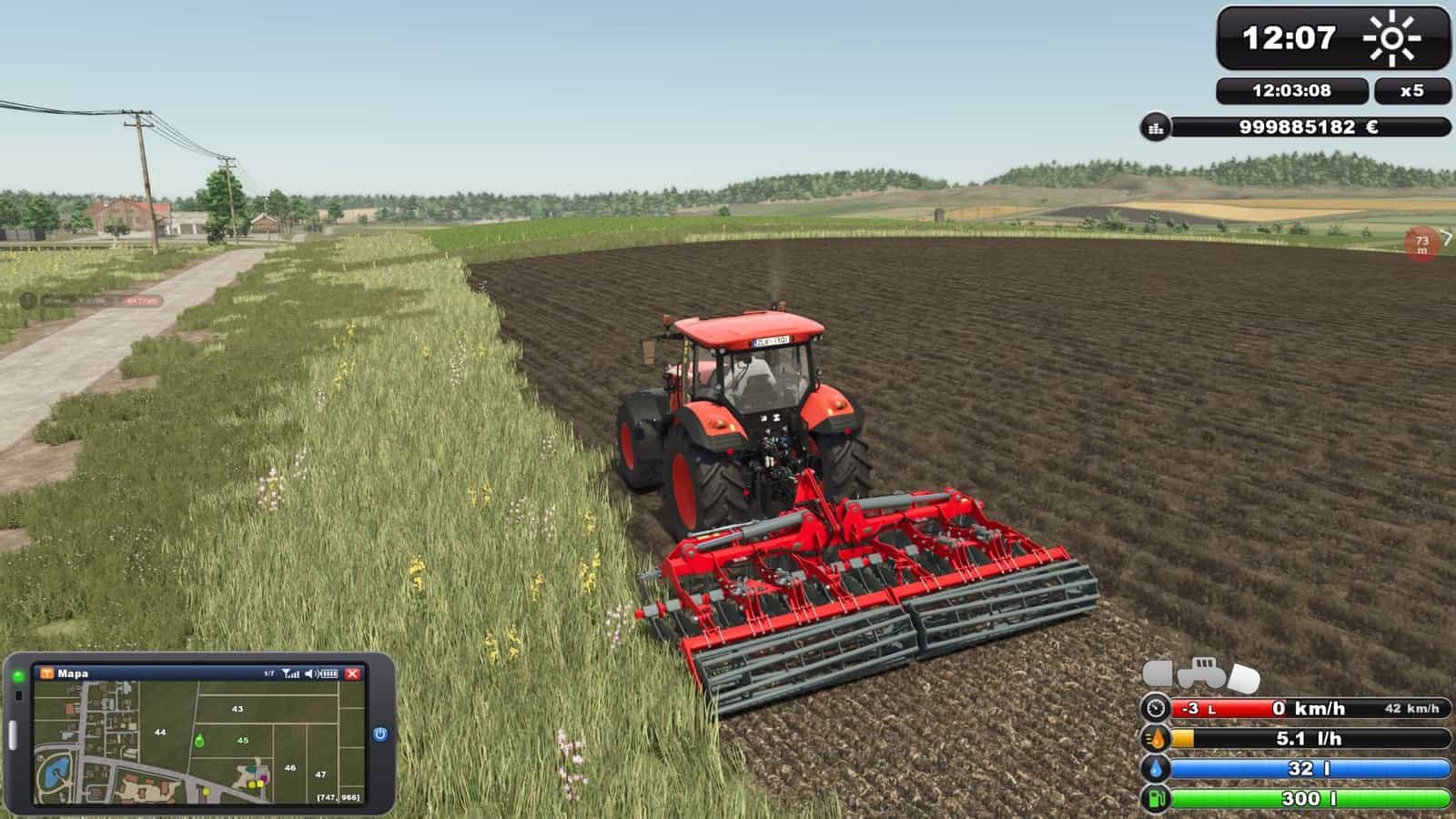
FS25 FS2011 HUD Style (Addon for Zasty HUD) V3.0
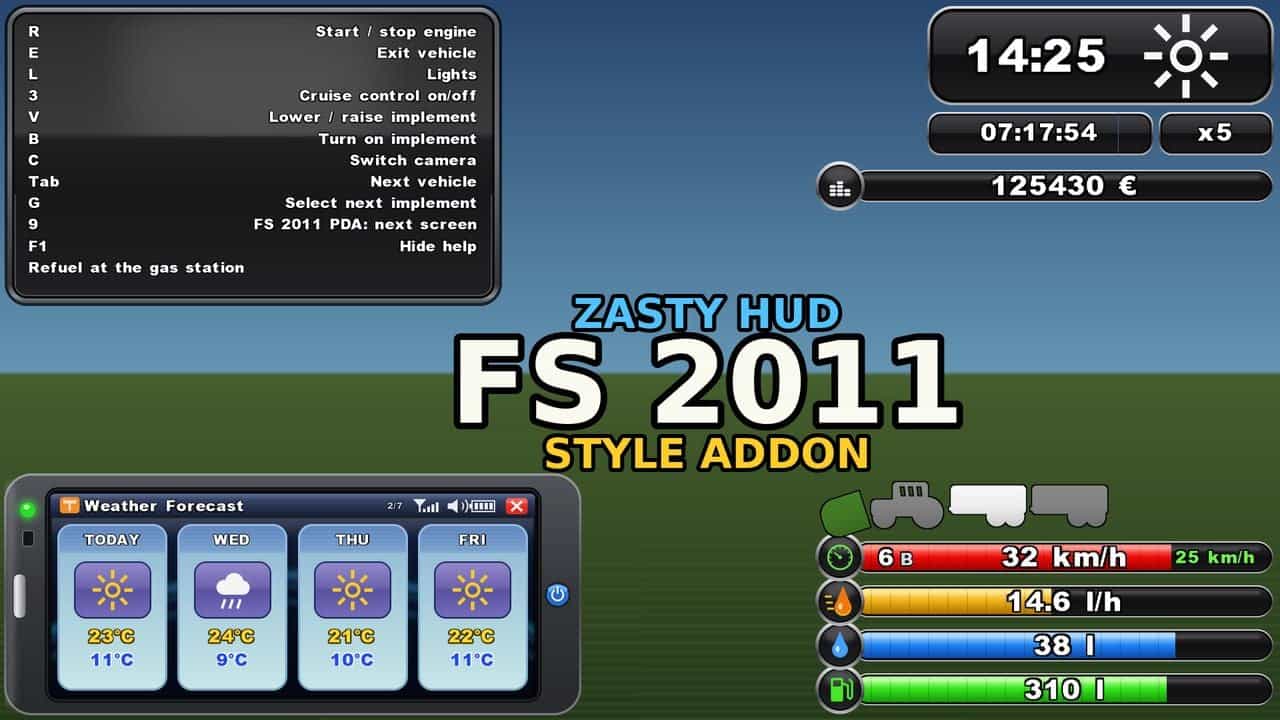
Bring the Farming Simulator 2011 HUD into FS25 with this addon for Zasty HUD by Zasty Chalk. It adds the third style, “FS 2011”, beside “Bar” and “Round” in the Zasty HUD settings window. When enabled, it completely replaces the FS25 HUD, preventing overlaps.
Bars (bottom right)
- Classic FS 2011 bar stack with speed, fuel consumption (l/h), AdBlue and fuel
- Speed bar: red fill indicates engine rpm, gear and gear group appear on the left, and cruise control speed is set on the right; the speed icon becomes green when cruise control is active
- Fuel consumption is shown in litres per hour, or 0 while the engine is off
- Vehicles with a DEF tank display a blue AdBlue / DEF bar, including base game and AdBlue mods
- Above the bars is the vehicle schema: tractor with front and rear implements. Switched on (B) is green, selected (G) is brighter, and lowered means tilted towards the ground
Clock (top right)
- FS 2011 clock including a weather symbol
- Real (computer) time and the time scale are shown below
- Your balance appears beneath the clock, both on foot and in vehicles
PDA (bottom left)
- The PDA takes the place of the FS25 minimap. Use the game’s minimap key (9) to change PDA screens, or use Left Alt + I; press once more to hide it, and every change produces the PDA beep
- Map: north up, heading marker, coordinates, field numbers with your fields in green, plus the game’s icons for the shop, selling points, productions and animals
- Weather Forecast: today and the following three days on FS 2011 day cards showing symbol, max and min temperature
- Prices: the best price for every crop
- Statistics: silo storage and animals
- Players: multiplayer only
- Vehicles: tractor with all implements and trailers, including state and fill levels
- Engine: rpm, load, temperature, gear, direction, speed, operating hours, fuel, AdBlue, consumption, damage, wear and total mass
- Tyres: with the Variable Tire Pressure mod, front axle, rear axle, trailer, road/field and inflating/deflating
- Farm: date, time scale, balance, field, crop, vehicles, farmlands and play time
- Change PDA size live in the Zasty HUD window using row “PDA size”, from 40-100 %
F1 help
- A single glossy FS 2011 box places the key on the left and the action on the right, and grows as more actions are added
- During build mode, the shop and menus it moves are placed on the right side
More
- The complete FS25 HUD it replaces is hidden: speedometer, minimap, fill levels, vehicle schema and time/money box; notifications and warnings stay
- Variable Tire Pressure hides its window and puts the pressures on the PDA. Its control panel, Ctrl+Alt+U, still works
- Languages: EN, DE, PL, FR, ES, IT, PT/BR, CZ, RU, NL, HU, TR. The addon also translates Zasty HUD itself into these languages and fixes its language detection in FS25, while Zasty HUD’s files stay unchanged
- Speed, volume and money use your game settings: km/h / mph, litres / gallons and currency
- The bars and clock use the “Size” setting of the Zasty HUD window
How to use
- Place
FS25_ZastyHUD_FS2011.zipin your mods folder besideFS25_ZastyHUD.zip - Activate both mods in your savegame
- Press Left Alt + H, then select Style: FS 2011
- Press 9, or Left Alt + I, to change between PDA screens
Notes
- The files belonging to Zasty HUD are not changed. Removing this addon lets Zasty HUD work as before, and a saved “FS 2011” style falls back to “Round”. With Bar or Round, the minimap key works as usual
- Client side only, for single player and multiplayer. If the game supplies no consumption figure, for example for multiplayer clients, it is measured from the falling fuel level
- When available, the forecast is read from the game. Otherwise, the Weather Forecast screen displays today only
- Other mods changing the game HUD may overlap. Please report problems with your
log.txt
Requires: Zasty HUD
V3.0.0.0
- New file name: the mod is now
FS25_HudStyles.zip– delete the oldFS25_ZastyHUD_FS2011.zip. If both files remain, the new version stays off and a pop-up window in the game tells you to delete the old one; your settings are kept - Version numbering now uses one digit between the dots, with 3.0.0.0 following 1.29.0.0
- New style “FS 15”: vehicle panel with round speed ring and green arc, fuel / AdBlue / fill level lines with a knob, and a strip containing vehicle schema, cruise control and attach symbol
- FS 15 adds a white clock box with weather and time scale, a black balance block, contract progress, a slightly see-through minimap, white F1 help with black key boxes, and tablet cards in the FS 15 look
- New option for FS 2011, Modern, Arcade, FS 15 and FS 17: the gauge can show engine rpm or speed, with scale numbers changing accordingly
- New option for every style: keep the minimap fixed with north up or have it turn together with the player; markers, field numbers, icons and the Arcade north mark turn with it
- FS 15 and FS 17 show player pins on the minimap for every player in their farm colour; your own pin can use Auto, farm colour, green or white
- FS 15 and FS 17 use the game’s own vehicle pictures in the vehicle schema, as in Modern
- FS 17 colours now match the original game: darker, richer, opaque panels, a black weather cell and F1 header; colours selected in the settings now appear on screen exactly as selected
- For FS 15 and FS 17, the “advanced controls” line of the F1 help displays mouse / gamepad button symbols and uses the same text colour as the other lines
- The Settings window, opened with Left Alt + H, is on one page: general settings first, followed only by settings for the style in use
- The Settings window can no longer remain empty with only the mouse cursor. A broken row is skipped, its error is shown and the error is written to
log.txt - Styles FS 2008, FS 19 and FS 22 are prepared and appear as “soon” in the settings window
- Tablet cards shorten names, states, selling points and values to fit their place, so nothing overlaps
- Fixed: in a vehicle, the game could freeze in FS 15, FS 17 and Arcade when a long F1 help text needed shortening
- All textures are compressed and the PDA beep is OGG, so there are no more “raw format” warnings in the log
V2.9.0.0
New styles
- New style “Arcade” has the look of arcade street racing games: twin dials for tachometer and fuel in 5 looks with night colours, big gear digit, own italic font, game time / status / contract panels, round minimap, F1 help in the Arcade look, every Modern function, and its own settings and colours
- New style “FS 2013” redraws the HUD of Farming Simulator 2013 with olive bars, pale icon tiles, operating hours and cruise control bars, a pale clock box with real time, time scale and balance like FS 2011, a dark green phone PDA with every tablet card, F1 help and its own settings
- New style “FS 17” redraws the HUD of Farming Simulator 17 with vehicle panel, dotted speed ring, operating hours, light symbols, fuel / AdBlue / fill level rows, schema and cruise control strip; weather / clock / time scale / balance bar; F1 help with key boxes; FS 17 minimap; own font, colours and settings
- “Lite” is renamed to “Modern”; new mod name: FS 2011 / 2013 / 17, Modern & Arcade HUD, working with Zasty HUD or standalone
Modern
- Tablet on key 9 with 5 looks: Basic, Tonal, Rounded, Retro-futurism and Modern glass. The selected look colours the whole Modern HUD; tablet shape options are 1:1, 4:3, 2:3, 5:2 or 16:9
- Tablet looks retain your colour, brightness and opacity changes separately per look
- New Retro tachometer: round dial with silver bezel, deep black face, LCD showing speed and a big gear, LCD fuel and AdBlue bars, plus face brightness and opacity settings