
FS25 Weather Wardrobe BETA 4
Weather Wardrobe automatically changes the clothing of the player, workers and employees according to the weather, temperature and configured season presets.
Features
-
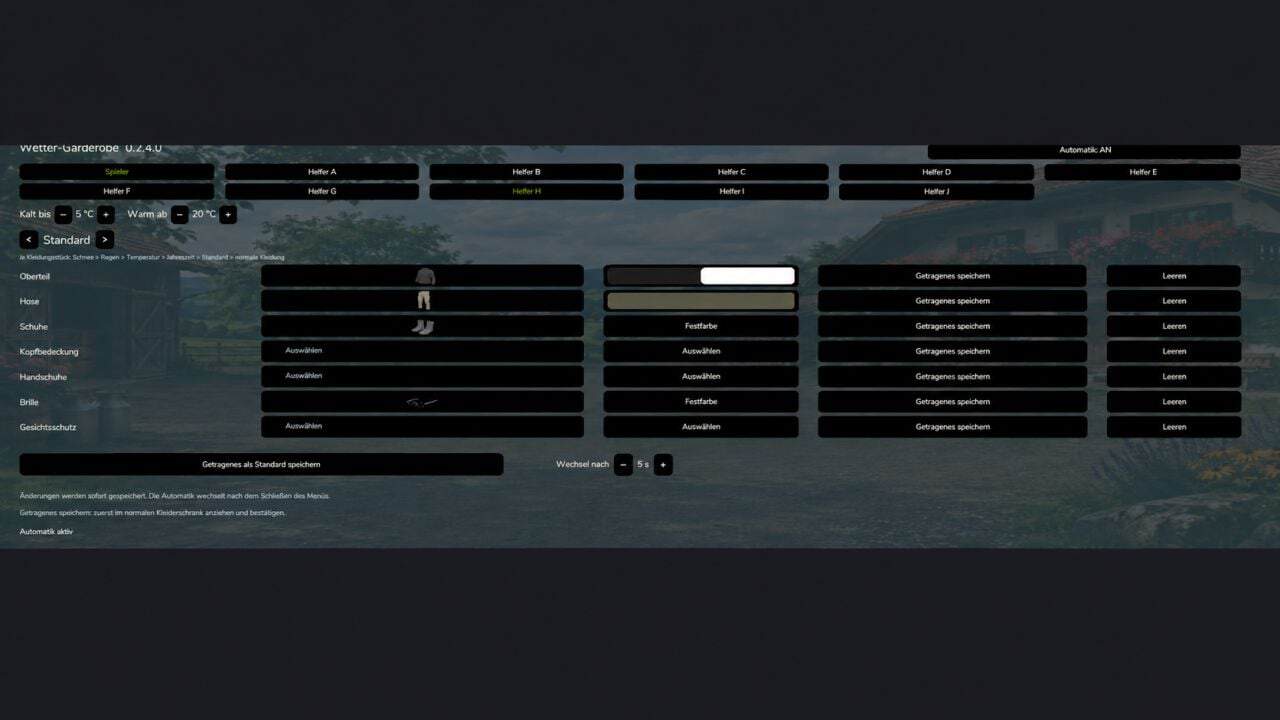
Open the wardrobe, then switch to the Weather Wardrobe tab.
Choose Player or a Worker at the top of the menu.
Turn on automation for the person you selected.
Define the temperature that counts as cold or warm.
Choose a preset, for example Rain, Winter or Warm, and configure its clothing and colors.
Your changes are saved automatically. Close the menu and wait until the time specified under “Change after” has passed. -
Clothing items that have not been assigned are obtained from the other suitable presets.
When presets overlap, they are used in this order: Snow → Rain → Temperature → Season → Default.
Use “Save worn clothing as default” to copy your current clothing and colors into the Default preset.
For the Player preset “Riding”, the selected items take priority while you are on horseback. Once you dismount, the clothing for the current weather is applied again. -
PlayerWorkers can be used as follows:
1. Activate Weather Wardrobe and PlayerWorkers in the savegame.
2. Go to the Weather Wardrobe tab from the wardrobe.
3. Select Player, activate automation for the player, and configure the clothing, colors and weather thresholds.
4. Close the menu and allow the configured change time to pass.PlayerWorkers takes the player’s current clothing and applies it to the workers. Because of this, separate worker presets are not used. While PlayerWorkers is active, both the Worker and Employee buttons open the player configuration.
-
When no clothing change can be seen, check the player’s outfit first: Is automation switched on, is an appropriate preset configured, and is the required weather condition present?
Multiplayer: PlayerWorkers duplicates the local player for each respective player. Consequently, the same worker can have a different appearance for different players.
-
Employees are configured in this way:
1. Activate Weather Wardrobe and Employees in the savegame.
2. Configure your employees as normal through Employees.
3. Open the Weather Wardrobe tab in the wardrobe.
4. Choose an employee with the button showing their name, for example “Robin (A)”.
5. Turn on their automation and configure the presets, colors, temperature thresholds and change time.The clothing may be configured before work starts. Once the employee is assigned as a driver, the suitable outfit is used.
- The presets are tied to the assigned worker slot. Renaming or replacing the worker does not remove their settings.
- Employees remains responsible for tasks, contracts, wages and working hours.
- In multiplayer, the worker presets are synchronized inside the respective farm. Every participant must use the same Weather Wardrobe version.
- When PlayerWorkers is active as well, employees also use the player’s clothing. Their individual employee presets are not used in that case.
Changelog
- BETA 4
– NEW DESCRIPTION, READ
– Bug fixes for the PlayerWorker-Mod and Employee-Mod
– UI adjustments for improved clarity.
– Added the “Tab” preset. - BETA 3
Mod adapted for:
– Player Workers
– Employees
– further minor bug fixes.
The integration has not yet been tested by me. Please let me know if you encounter any errors. It should work so far. - BETA 2
– AI helpers can now be customized, for helpers A to J.
– Several errors have been fixed, especially in multiplayer.