

FS25 Real Fuel Consumption V1.6.2.0
Real Fuel Consumption calculates diesel use for tractors, combines, self-propelled machines and trucks from the power their engines are delivering. Vehicles no longer rely on one fixed multiplier.
The calculation includes PTO work, slopes, vehicle weight, draft, engine speed, working conditions and rolling resistance. Trucks also account for air drag and road rolling resistance. Fuel use is the only thing affected, so vehicles do not become slower and their driving behaviour does not change.
Features
- The delivered engine power and engine speed determine fuel use. If the load stays the same, reducing rpm also reduces consumption.
- Plows, cultivators, disc harrows, subsoilers and seeders receive real draft based on working width, speed and depth. Compatible with Variable Working Depth.
- Every wheel receives rolling resistance according to the ground and its moisture level. Mud costs more.
- Trucks have a separate truck engine calculation. It includes air drag and road rolling resistance, so a loaded truck or an uphill journey uses more fuel.
- AdBlue retains its ratio to diesel. Cars, electric vehicles and methane vehicles continue with the calculation provided by the game.
- Use Alt+J to change the engine mode:
- ECO limits engine rpm to the peak-torque speed of each engine and makes throttle response smoother. Fuel is saved while spare power is available, but the saving is small at full load.
- STANDARD runs the factory engine.
- POWER responds to the throttle faster and supplies +10 % power during transport and while the PTO is working, like John Deere’s IPM. The fuel cost of that extra power is included.
- Changing the engine mode produces a dashboard switch click.
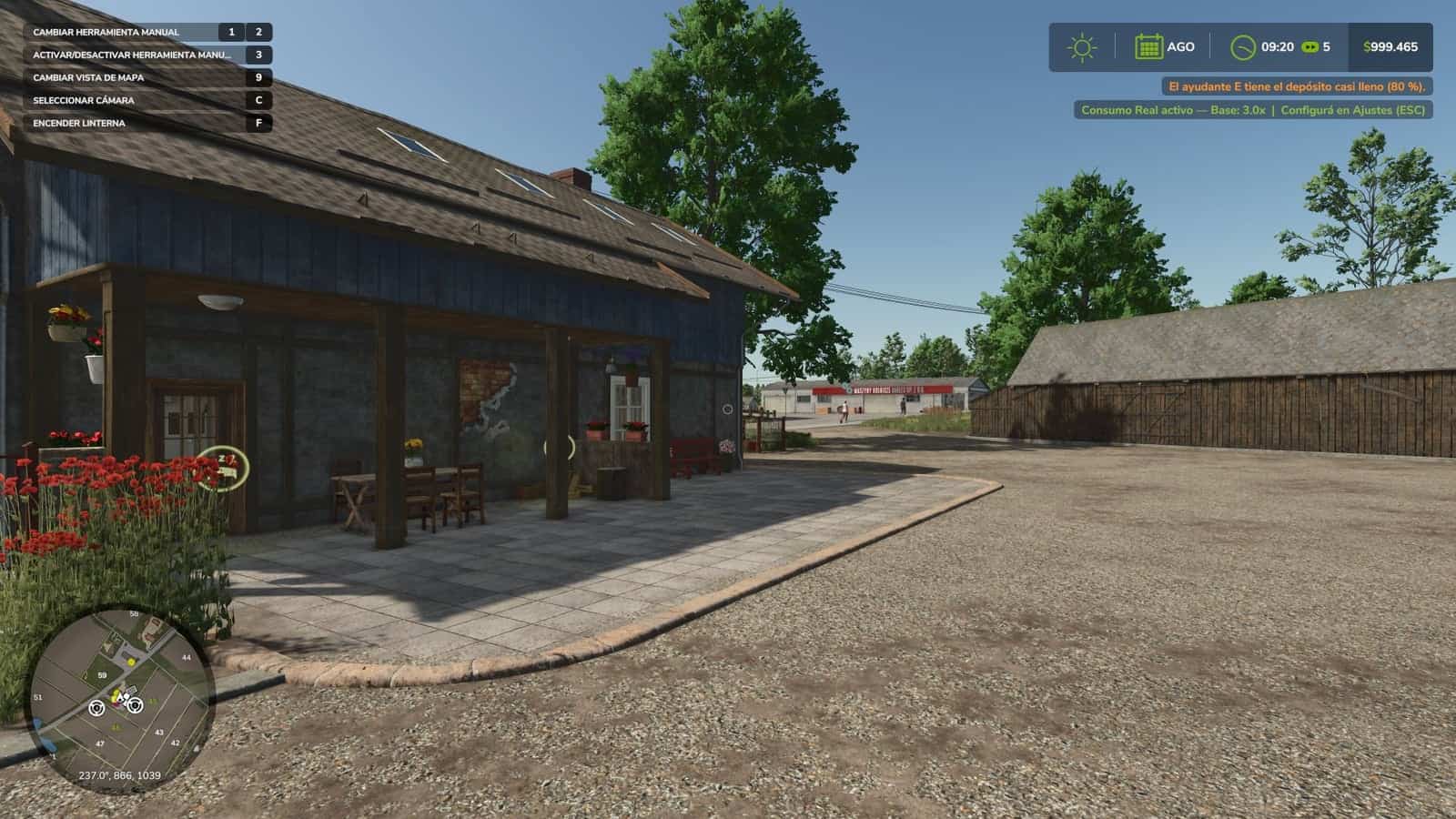
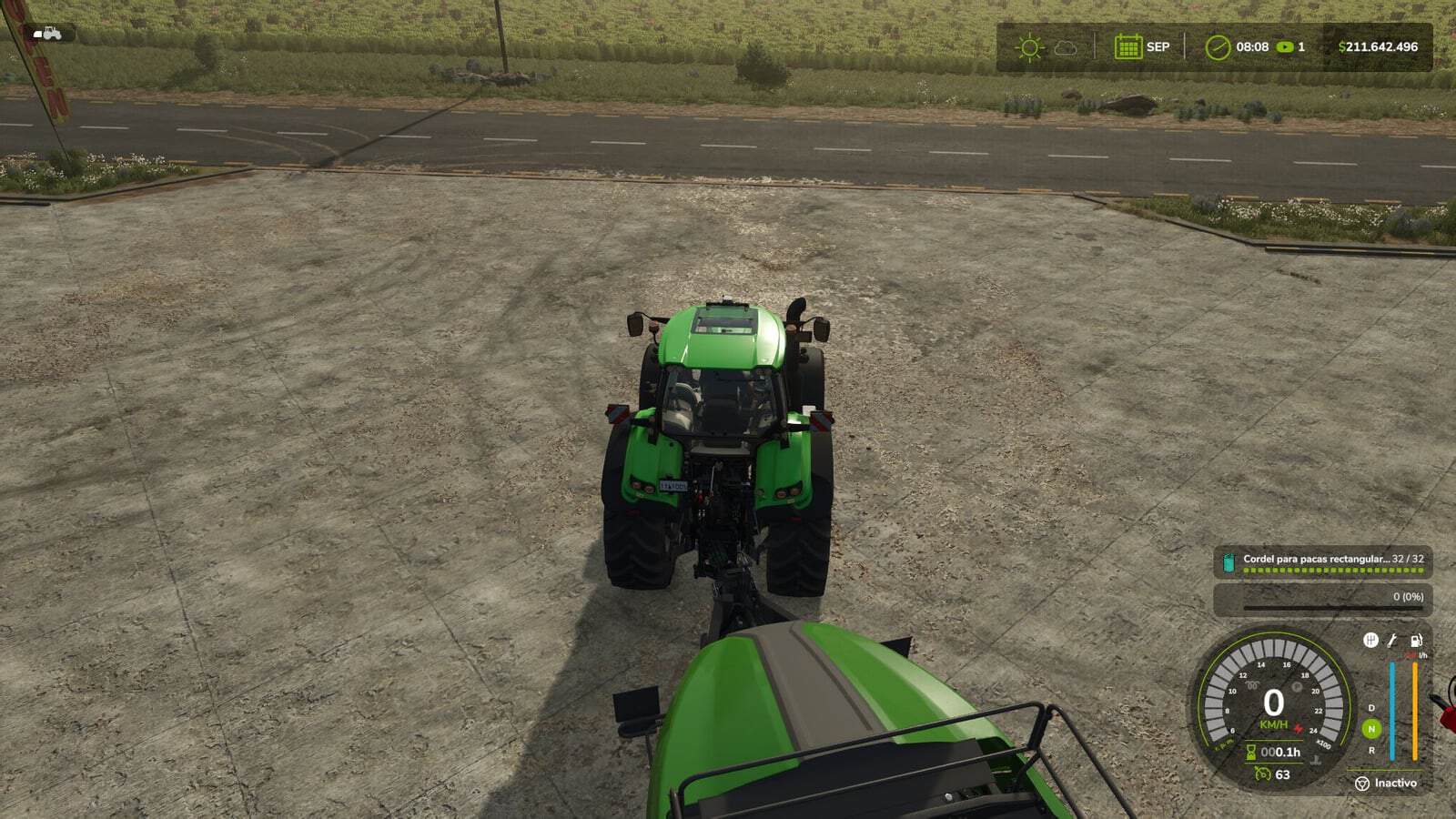
- Consumption is shown below the fuel gauge in the same size used by Advanced Damage System’s reading. The value uses the selected mode’s color: l/h, kW for electric vehicles and kg/h for methane vehicles.
- The engine mode icon is placed beside the speedometer. It has one position when Advanced Damage System is present and another when it is not. Both positions follow the game’s HUD scale.
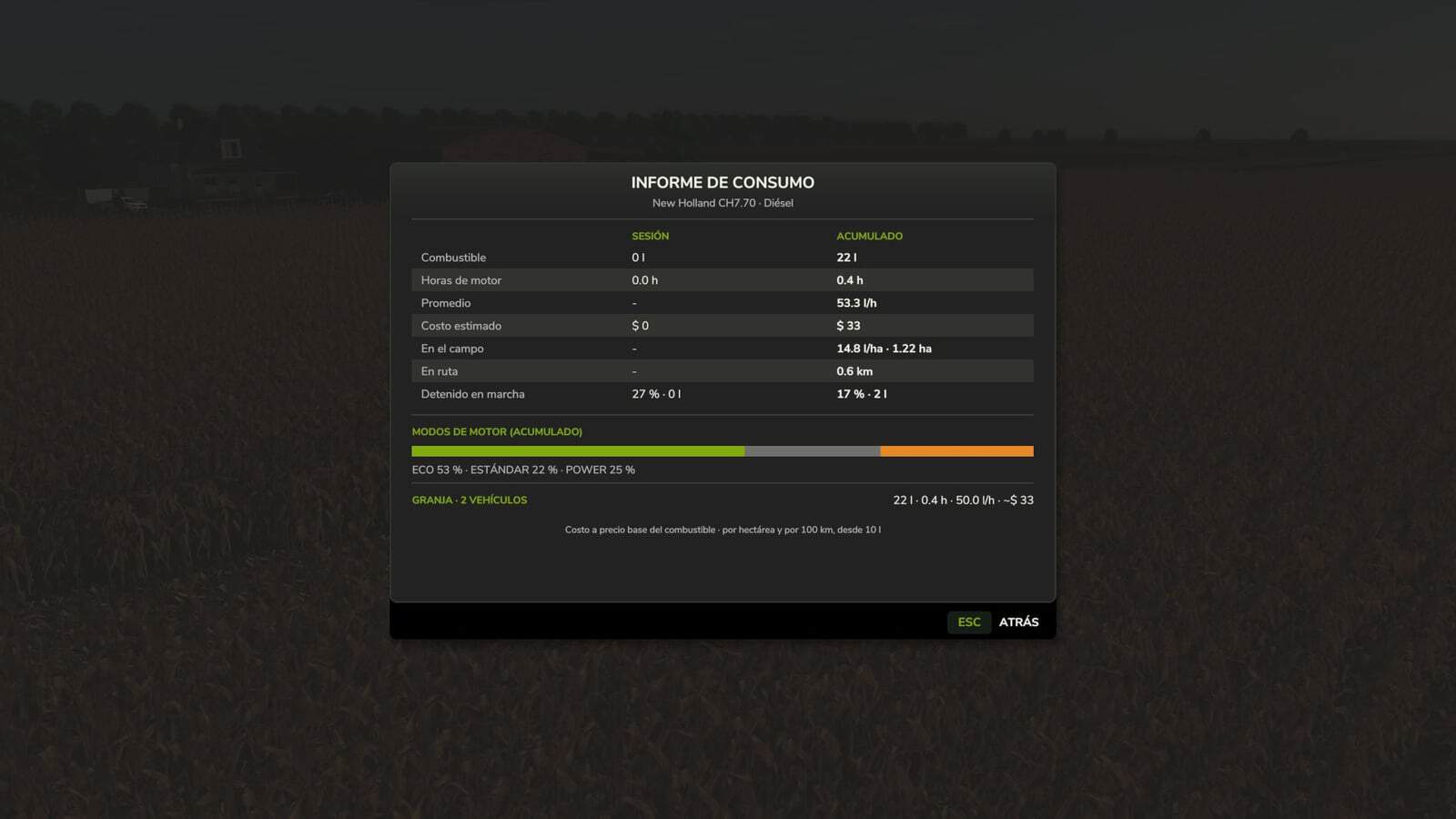
- Press Ctrl+J to open the fuel report. It lists liters, engine hours, average l/h, the mode split and estimated cost, both for each vehicle and for the farm.
- Field work is reported in liters per hectare, road use in liters per 100 km, and stationary running in time with the engine on.
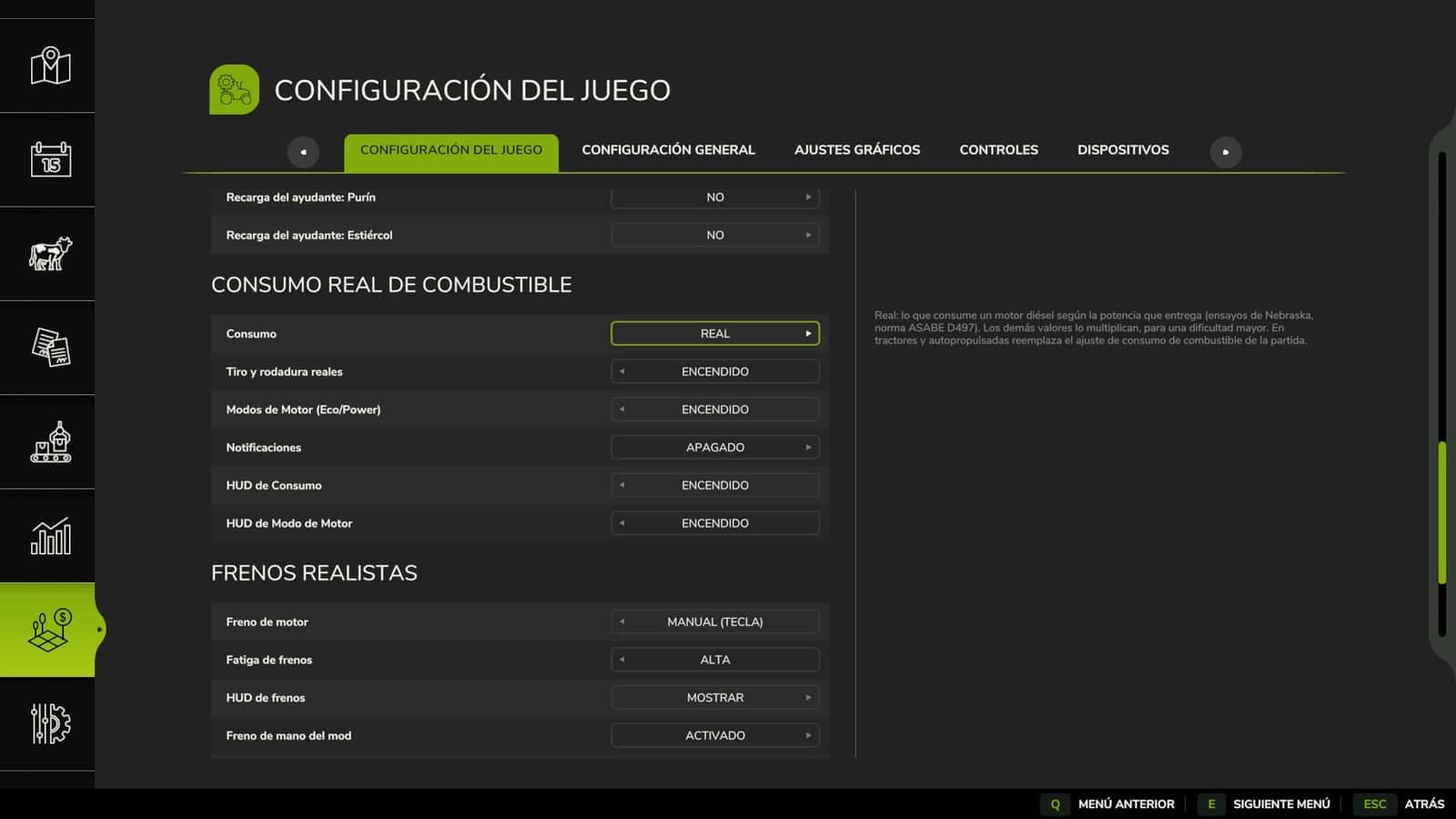
- Find the settings at ESC > Game Settings.
- Consumption can be Real, or increased from x1.25 through x3 for a harder game.
- Separate options are available for real draft and rolling resistance, engine modes, notifications, the fuel HUD and the mode HUD.
Compatible with:
- Multiplayer and Dedicated Server
- Advanced Damage System, whose breakdown surcharge is added to the real consumption
- Variable Working Depth
Changelog
V1.6.2.0
Fuel report, Ctrl+J: The report now opens as a compact screen. Its table places session and total values side by side for fuel, engine hours, average, cost, l/ha in the field, l/100 km on the road and idling. A bar displays the time used in every engine mode, while the farm total is shown on a single line. Previously, the field, road and idling information no longer fitted on the screen.
Engine modes: ECO used to soften the throttle without lowering engine speed, which meant that its fuel saving was very small. On CVT and hydrostatic machines it now reduces engine speed when spare power exists, then restores it at full load without reducing top speed. At 20 km/h, a combine runs about 350 rpm lower and consumes about 14 % less.
For CVT and hydrostatic machines, POWER keeps the engine near rated speed while driving. That makes the power immediately available, although partial load costs a little more fuel.
Automatic gearboxes, including those in trucks, cars and powershift machines, shift up sooner in ECO. POWER holds the lower gear longer and shifts down sooner when climbing.
During work, including threshing, PTO operation, an implement working or a machine switched on, the selected mode is always reflected in fuel use. ECO consumes 8 % less at partial load and 4 % less at full load, but has 7 % less pulling power and therefore feels heavier. POWER consumes 5 % more. Before this change, the three modes used almost the same amount while threshing or using the PTO.
During threshing, POWER now gives combines +8 % power. Tractors retain their +10 % bonus for transport and PTO work.
POWER’s quicker throttle response now activates when additional power is requested by pressing the pedal or accelerating. At a constant speed, CVT machines no longer keep searching up and down through engine speeds.
Multiplayer: The Fuel Consumption HUD and Engine Mode HUD are now stored in the savegame together with the other settings. When the host disables them, they are disabled for all players. Previously, other players could still see them. Compatible with savegames from 1.6.0.0. Multiplayer and Dedicated Server supported.
V1.6.0.0
New: Trucks now calculate fuel use with a truck engine and include air drag and road rolling resistance, neither of which was present in the game. Loads and uphill roads increase consumption: a 40 t truck at 80 km/h uses about 32 l/100 km, compared with about 23 when empty.
Subsoilers and seeders now use the fuel they actually require. Previously, a 6 m seeder barely created any pull in the game.
POWER adds power in the manner of John Deere’s IPM: +10 % in transport and with the PTO working, with the fuel cost of that power also included.
The engine mode change now has the sound of a dashboard switch click.
While working, rfcConsumo displays liters per hectare, and on trucks it displays liters per 100 km.
Fixed: The icons no longer appear on top of the fuel report.
Changed: The mode icon uses one position with Advanced Damage System and a different position without it. It no longer has letters or a message when the mode changes. Compatible with savegames from 1.5.0.0. Multiplayer and Dedicated Server supported.
V1.5.0.0
Engine mode key, front loader arm would no longer move: J originally changed the engine mode, but the game uses J by default for raising and lowering the front loader arm, and other implements use it as well. If two controls use one key, the game leaves only one active. For many players, that stopped the loader arm from moving.
The engine mode is assigned to Alt+J now. Anyone who used J will have the control changed once automatically and will receive an on-screen notification. If the control had already been assigned to another key, that personal setting remains.
The key remains editable under Options > Controls at any time.
More realistic fuel consumption: Tractors, harvesters and self-propelled machines now consume according to the power their engines produce. Load, uphill travel and work raise consumption, while an unloaded vehicle uses much less.
At full load, a large tractor burns around 64 l/h rather than the previous 183 l/h.
Working width, speed and depth determine the additional fuel used for plowing, cultivating and discing. Compatible with Variable Working Depth.
Mud and cultivated soil raise consumption when compared with stubble or roads.
This additional consumption changes fuel use only. It neither slows the machine nor changes its handling.
Trucks, cars, electric vehicles and methane-powered vehicles still use the original calculation from the game.
Engine modes: ECO lowers engine RPM and makes the throttle response smoother. When excess power is available it saves fuel, whereas the saving is minimal under full load.
POWER makes throttle response faster.
Engine modes no longer lower power or restrict top speed.
Settings: Consumption now has a Real option, which is the default, plus x1.25 to x3 for increased difficulty.
A new Realistic Traction & Rolling Resistance option can be enabled or disabled.
Base Multiplier, Load Sensitivity, Work Type Bonus and RPM Sensitivity have been removed. The calculation now takes care of everything automatically.
HUD: The fuel value appears below the fuel gauge and uses the same size as the ADS reading. Its color matches the selected engine mode: green ECO, gray STANDARD and red POWER. It appears instantly.
Electric vehicles show kW, while methane vehicles show kg/h.
The icon and reading use the game’s HUD scale.
Report, Ctrl+J: In the field, the report shows liters per hectare while working. On the road it shows liters per 100 km, and it also shows engine running time while stationary.
Each vehicle uses the correct fuel unit and fuel price in the report.
Fixes: Dedicated Server clients no longer permanently receive a reading of 0.0 l/h.
If Advanced Damage System raises fuel consumption, this mod now continues working on that vehicle. The two consumption values are combined.
Vehicles excluded from Advanced Damage System no longer lose their fuel consumption display.
Truck brake air pressure no longer counts as actual fuel consumption.
Savegames from 1.4.x remain compatible, so a new game is not required and accumulated report data is retained. Earlier consumption settings are not transferred: every savegame begins with Real consumption. Multiplayer and Dedicated Server supported.





