
FS25 Animal Dirt Settings V1.0
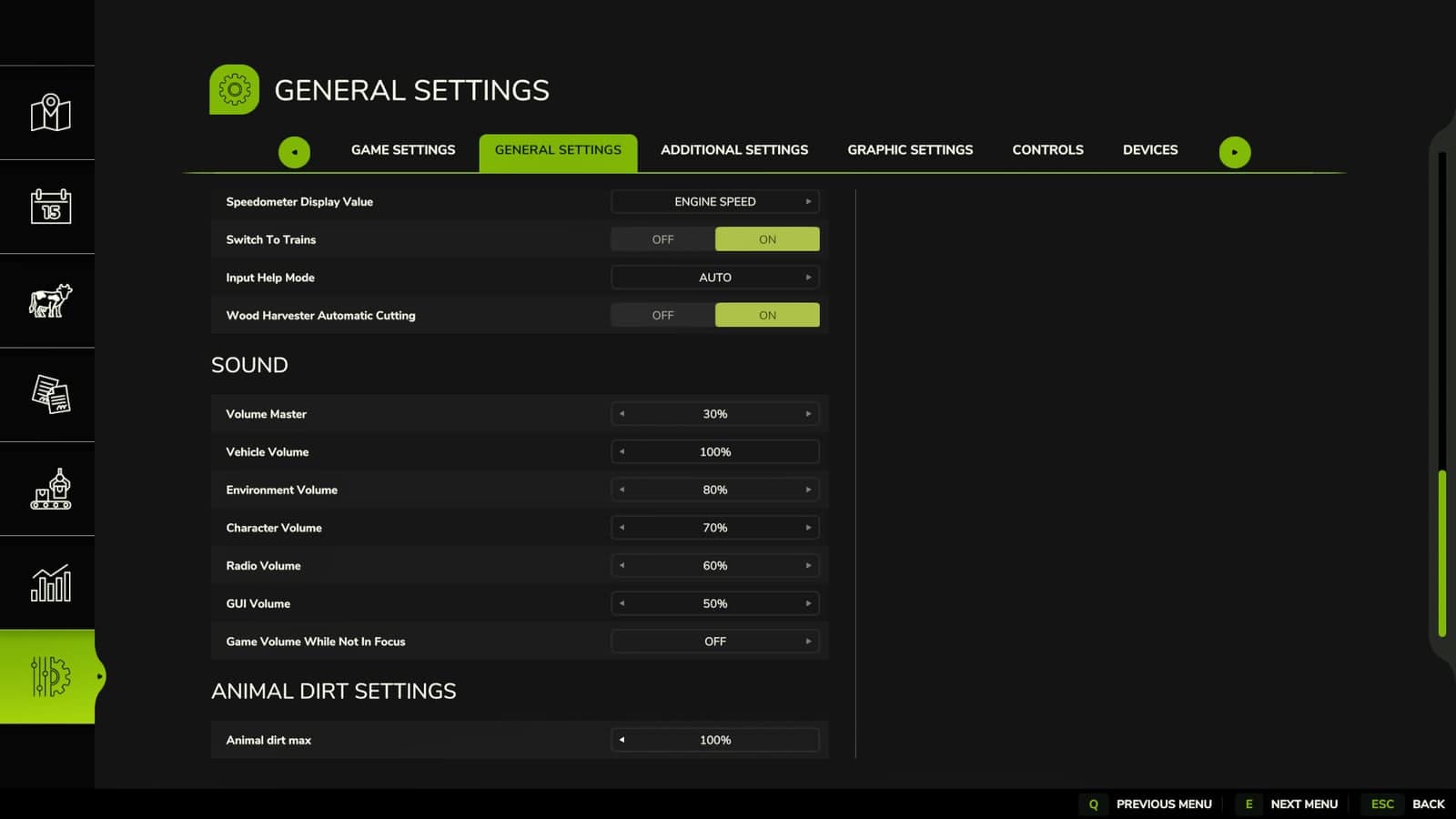
Animal Dirt Settings is a Farming Simulator 25 script that lets you decide in the game settings menu how dirty animals are allowed to become. When it rains, manure and dirt wash off the animals, and they get cleaned.
Features
- Configurable animal dirt limit from the game settings menu.
- Useful companion mod for animal cleaning and realism setups.
- Lightweight script focused on animal-care gameplay.
Specifications
- Game: Farming Simulator 25.
- Public file name:
FS25_AnimalDirtSettings.zip. - Listed version: 1.0.0.0.
- Multiplayer: Supported.
- Script language: Lua.
- Script descriptor:
modDesc.xml.
How To Install Animal Dirt Settings
- Download the ZIP file.
- Keep
FS25_AnimalDirtSettings.zippacked as a ZIP. - Place it in
Documents/My Games/FarmingSimulator2025/mods. - Start Farming Simulator 25 and enable Animal Dirt Settings from the savegame mod list.
- Load a copied save before using it on the farm you care about.
- For terrain, animal, or vehicle behavior scripts, test on a backup save first.
No separate required-mod list is shown for Animal Dirt Settings. Install FS25_AnimalDirtSettings.zip by itself and then test it with the rest of the active mod folder.
Livestock Care Testing
Place or enable the mod, watch the animal area during feeding, and confirm that outputs, food, bedding, and markers still behave normally after a reload. Test it on an animal-focused save where feeding routines, visible animals, care triggers, and output areas can be watched across more than one in-game hour.
Compare Animal Dirt Settings in the exact job already performed on the farm instead of judging it from a separate test scene.
Animal Dirt Setting Troubleshooting
Test this animal-care script carefully with other livestock, feeding, dirt, barn, pasture, and husbandry mods, because two systems can sometimes update the same animal area or daily routine. Check the animal menu, the placeable trigger, visible animals, feed levels, water, straw, manure, slurry, pallets, and any special food type the mod adds.
The active gameplay logic is written in Lua, the scripting language Farming Simulator 25 uses for script mods. Lua is loaded directly through modDesc.xml. When another mod touches the same feature as Animal Dirt Settings, test them together on a copied save before moving both into the main farm.
Testing Notes
Load the animal area, feed or bed where relevant, wait through normal time, check outputs or markers, then save and reload the same placeable. While testing, change one thing at a time and write down the map name, game version, mod version, and the other active mods that touch animal-care routines.
After the first successful test, save, quit to the menu, load the same save again, and repeat the feature once more.
If an animal marker, feed plane, food type, pallet, manure area, or visible animal does not appear, test with only this mod and the map enabled before blaming the save. If something is wrong, test with only the map, this ZIP, and required animal files before adding other livestock mods back into the folder.
Compatibility Notes
This animal-care script should be tested carefully with other livestock, feeding, dirt, barn, pasture, and husbandry mods, because two systems can sometimes update the same animal area or daily routine.
Changelog
Animal Dirt Settings current public version is v1.0.0.0.
Keep only one copy of FS25_AnimalDirtSettings.zip in your active Farming Simulator 25 mods folder.